
How much do you want to be in charge?
Earlier this year, I assembled a two-row Eurorack system for my studio. It felt like the perfect addition to my no-computer corner, which is home to a small collection of analog synths, guitar pedals, and hardware effects.
While I can patch everything into my computer, record and control some of the synths through my DAW, this synth corner is by default not connected to my main studio system. Since I want this area of my studio to be a fun little island of sound exploration and inspiration, I didn’t want any screens, laptops, or computer keyboards around.
After long composing or mixing sessions during which I continuously work on a computer and look at a screen for hours on end, I enjoy occasionally firing up my synth corner and just trying out new ideas and letting myself be surprised by new connections. And, most importantly, give my analytic left brain some rest.
A brain in the mail
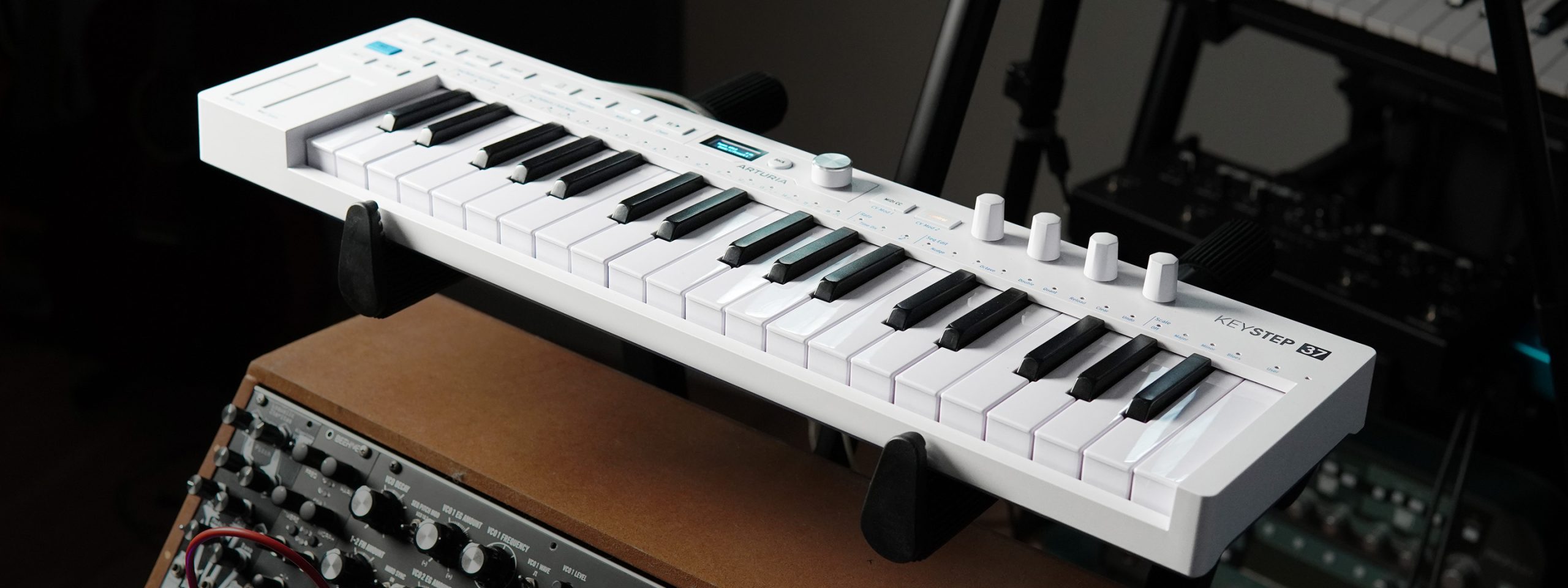
Right as I finished building out the Eurorack system, Arturia approached me and sent me their KeyStep 37 mk2 compact controller to try. Call that perfect timing, because between those Eurorack sound generators, filters, and modulators, I still needed a “brain” that could speak to the different modules.
One note first, though, because I want this to be out of the way as early as possible in this article: While Arturia kindly sent me their keyboard for free, I have neither an affiliation nor an ad deal with the company, and I’m not paid to write this. This is not a plain review or feature check, but more like a field report taken while living and working with the KeyStep for a while.
So I quickly connected the KeyStep to power and asked myself if this little thing barely bigger than a computer keyboard could be the brain my synth corner was missing.
Well, the answer was yes, and it only took me a few hours to be sure. Over CV, it spoke to my Eurorack modules with pitch, gate, and two mod signals. Over MIDI, it could be connected straight to my more modern synths like the Novation Peak or my MatrixBrute (which also has comprehensive CV capabilities). If that had been it, I would have been very happy. But little by little, I found out that a big part of KeyStep’s design is about taking your ideas further and generating entirely new and inspiring results along the way. This sent me down a rabbit hole of testing how far I could take this generative concept and how much control I could hand over to this tiny device when creating new sounds.
The specs in short:
- Keys: 37 slim keys, velocity-sensitive, with channel aftertouch
- Dimensions: 484 x 145 x 50 mm
- CV/Gate out: Pitch, Gate, plus two assignable Mod CV outputs
- Mod CV sources: Velocity, Aftertouch, Mod Strip, Random, Pulse, LFO, Envelope, Cycling Envelope
- Sync and MIDI: Clock/Sync in and out (TRS), MIDI in and out, USB-C
- Sequencer: polyphonic step sequencer, up to 64 steps, multiple patterns with variations
- Arpeggiator: 16 modes, including random and generative phrase modes
- Generative tools: Mutate (melodic and rhythmic reshaping) and Spice (rhythmic variation)
- Assistive modes: Scale mode, Chord mode, Strum
In control
At first glance, the KeyStep 37 mk2 appears just like a regular, mobile control keyboard for music producers on the go. It features three octaves worth of velocity-sensitive keys, 37 in total, with the option of switching octaves up and down by the push of a button. It also has touch strips for pitch bend and modulation control, a small OLED screen, and a handful of dials and encoders to help you navigate its menus and functions. Lastly, the KeyStep has its own playback section to start, pause, stop, and record sequences. Most of the keyboard’s controls are assigned to dual functions which can be selected by holding the Shift button.
Over a single 3.5 mm cable, the KeyStep can send and receive a sync signal, start and stop included, so it can run the rest of the rig or fall in behind whatever is already playing.
One of the first things I did with the KeyStep was building a sequence, using the keyboard’s step recording feature. If you want, you can choose a root note and/or scale, and the KeyStep will adjust any notes you input to this setting, so notes outside of the selected scale are automatically shifted to the closest on-scale note. If you just want to quickly lay down an idea or want to make sure everything you play adheres to another player’s performance, this can be quite a time-saving and reassuring feature.
But back to the sequence. I wanted to create a driving, propulsive sequence similar to those made famous by Ludwig Göransson’s score to Tenet.
Here’s the patch for those interested:
The pitch CV left the KeyStep, hit a buffered multiple, and split in two. One copy drove the Loquelic Iteritas, the other fed the DFAM’s oscillator, tuned an octave down for weight. The KeyStep’s gate went into Maths, and a stack cable carried the same gate to a second Maths channel, so one trigger fired two envelopes at once. Those envelopes opened two VCAs in the Four Play, one per voice, and both voices eventually ran out into the BigSky for space.
I controlled the two FALL knobs on Maths and rode them as the sequence ran, tightening or stretching the decay manually. This way I was able to create short, stabbing sounds one moment, longer and heavier the next.
Here is where I came upon one thing the KeyStep wouldn’t do, though. It won’t let me ratchet a single step of the sequence on its own, and that fast stutter is half of what makes a sequence like the one I wanted to create feel urgent. So I found a little workaround and built the stutter out of the grid instead. I set the whole thing to 32nd-note resolution, tied most of the steps into longer 16th notes, and left the odd step untied to fire as a quick burst. It isn’t a real ratchet, but it gets you there. It just took a bit of fiddling around.
Giving control away
After I explored the control side of the KeyStep 37 for a while, I was excited to try out the creative and generative features the keyboard was heavily marketed with. Things like the Mutate, Spice & Dice features promised a great way of generating variations from my ideas or creating entirely new ones.
Mutate, for example, can reorganize a programmed sequence with the press of a button. What’s cool about this is that it doesn’t just throw random notes at you. It takes the notes you already chose and finds new ways to sequence them. So your initial idea stays, but the order of execution is controlled by the machine. It almost feels like you’re handing your idea over and ask what else it could become. With each push of the Mutate button, your sequence gets rearranged on the fly, so hitting the Mutate button multiple times in a row can change your initial arrangement quite drastically and continuously creates new outcomes.
With Mutate engaged, KeyStep’s four rotary knobs become controllers for probability, randomness, polyphony, and density. Depending on where you set these parameters, you either receive slight variations of your sequence or chaotic new interpretations that shift across multiple octaves. You have to find your sweet spot for what you want to do, and mine landed around 10-15 percent most times, depending on the patch. Enough to keep surprising me but without breaking the musical logic. A neat design choice is that you can hold down the Mutate button, turn either of the four encoders while a sequence plays and it will update as soon as you let go of the button.
I don’t want to pretend that I always agreed with the musical decisions Mutate made for me. Sometimes, I pressed the button ten times hunting for the one version that clicked, and other times I gave up and went back to playing by hand. And that’s part of letting go of control, too, I guess.
Another cool feature of the KeyStep 37 mk2 is called Spice, which focuses more on the rhythmic side of things. By holding Shift and sliding the mod strip up, it works on how the sequence plays instead of what. It introduces gate length variations and ratcheting stutters that come and go. Spice leaves your harmonic sequence alone, so I felt I could lean on it harder than Mutate without the sequence falling apart. While Spice shifts the rhythm the same way every time you push it up, Dice gives you a different roll of the same idea. Hold Shift, tap the mod strip three times, and a new variation re-rolls without you touching the amount.
For cinematic synth composing, I reach for it constantly because it can really loosen a stiff or uninspired pattern. The arpeggiator has its own take on this. You can play a rough idea, switch on a random or generative arp mode, and it hands a spruced-up version back to you. I like to use it every time I’m falling back to the same boring arp patterns again and again.
Mutated and Spiced sequences can be stored and recalled, as can arp patterns when you convert them to a sequence, which provides a great way of trying out different variations without losing anything you might want to come back to later.
In the video below, I hold Mutate and turn the four encoders, then bring in Spice and roll the Dice, all on the same little loop.
Another interesting find I made along the way had to do with control voltages. The KeyStep can hand raw chance to its CV outputs as well. The Mod outputs can put out a random voltage with a range defined by you. On its own it does nothing, but with a sequence running, every new step throws a fresh random value at whatever you patched it into. For example, send it to a VCO’s pitch input, and each step gives you a random note. Point it at a timbre control (that of the Mutable Instruments Plaits, for instance) and the tonal character shifts under the melody while the notes stay untouched. There’s also a free-running LFO on the same Mod CV outputs for continuous movement instead of per-step jumps. For me, that’s plenty of options to create interesting sequences and sounds with my Eurorack modules.
Humanizing
The last feature set I had lots of fun fiddling around with is less about randomization or variation but much more about making things sound less mechanical or programmed. Out of those, I think the Chord mode surprised me the most.
Over MIDI into a polyphonic synthesizer, I used the strum control of the chord mode to break chords apart. It’s that small human spread across the notes and to me made all the difference between a chord that’s programmed and one that’s played.
Out of pure curiosity, I then tried Strum with a single monophonic oscillator in the rack, wondering what it could do. Expecting little, I got something better than I had any right to expect. If you set the spread wide and keep the strum short (around 40 to 100 ms), one oscillator plays the chord as a fast arpeggio, close to a harp glissando. If you push the strum longer, it even starts to sound like a chiptune line from an old game.
Aftertouch was honestly one of the features I overlooked somewhat, right until I tried using it in a patch. I sent the aftertouch output into my Loquelic Iteritas VCO, onto its Damp and Wavefold functions. Leaning into a key now bends the sound. It distorts, detunes a little and moves under the finger. This made aftertouch a really cool way of injecting imperfection and life into synth sounds and helped me create some cool signature-style trailer sounds.
Here’s what that looks and sounds like. Using Aftertouch, you can press into a key while holding a note while the tone bends and distorts with it.
What the KeyStep can and can’t do
Looping back to the beginning, my synth corner is designed to surprise me and leave me with a sound or idea I wouldn’t have come up with sitting in front of my DAW. Every part of the KeyStep’s design points this way, too. The sequencer and arp mode let me come up with an initial idea, Mutate, Spice and Dice rearrange notes and vary the rhythm. The random outputs throw chance at my synths. Everything is made to take my ideas and turn them into something new using chance and probability.
One thing that sadly falls a little short with the KeyStep are truly generative capabilities. What I’d loved the KeyStep to do is to keep going on its own in a generative way, letting a sequence or melody change slowly over time without my hands even on it. Yes, each press of Mutate gives you one new iteration, but it stays put until you press again. The arpeggiator’s random mode only reshuffles the notes you’re already holding but doesn’t add anything new. So the keyboard does chance, and it does generative textures, but a sequence that evolves by itself, hands-free, is just past what it can do for you, if you’re looking for those kinds of features.
Why I’ll keep it anyway
Apart from its shortcomings in working truly generative, the many creative tools, control features and smart design choices the KeyStep brings to the table make it a valued resident in my synth corner.
It earns this spot in a simple way: it does what I brought it in to do and much more. And it takes up almost no room doing so. The keys, knobs, encoders and mod strip feel properly made, light without feeling cheap. The OLED display, while being quite tiny, is brightly lit so you can easily read it during a late-night session or on a dim lit stage.
The KeyStep sequences, arpeggiates, it drives and modulates and randomizes the whole synth corner, with no computer screen in sight.
The real reason is the question I opened with: how much do I want to be in charge? Most sequencers answer it for you. They either lock you to a grid that does what you say, or they run loose and do what they like. The KeyStep sits on the dial between those two and lets you turn it, note by note. It lets me be fully in command when I want to be the composer and it’s happy to hand me something I’d never have written when I don’t feel as inspired. The move between both states takes one button held under a thumb. And to me, that’s rare to find in one box, especially at this affordable price point (regular price: €189).
That’s why the KeyStep 37 mk2 became the brain that my synth corner was missing.
Who the KeyStep 37 mk2 is for
you run a Eurorack rig or a set of keyless analog synths and you need one thing at the center to drive it all without bringing a computer into the room, the KeyStep 37 mk2 is close to ideal. The same goes if you make music on the move and want to catch ideas fast, or if you perform live in a tight space and need a sequencer, an arpeggiator and a controller in one slim unit.
It’s less the right call as a primary playing keyboard. Thirty-seven slim keys mean constant octave-switching, which is fine for sketching, but not as suitable for real piano players. And if you want a box that evolves a whole piece on its own while you watch, fully hands-off, this isn’t that, either. It hands you variations and new ideas, but doesn’t take over the composition.